 +1 (800) 844-6603
 Follow Us

Coffee shop POS you can start for $0
Siiopa is a free POS app for coffee shops, kiosks and coffee carts. Set up your short menu in minutes and sell from the Android phone or tablet you already own.
Free to start. No credit card. Android 6.0 and newer.
Made for a short menu and a long morning line
Most coffee shops sell a dozen drinks and a few pastries. You don't need a big system for that.
A short menu, set up in minutes
Start from sample items or import a spreadsheet, then add your prices and photos.
Milk, shots and syrups as extras
Extras stay with each drink and show on the order and the receipt.
Call orders by token
Every order gets a token number, so you can call "number 12" when the latte is ready.
Notes for the barista
Extra hot, half sweet: add a note to any item before it goes on the ticket.
What it takes to start selling
A new coffee shop has enough costs. Siiopa keeps the point of sale off that list.
| Siiopa app | Free to start. No credit card needed. |
|---|---|
| Phone or tablet | The Android device you already own, 6.0 or newer. |
| Receipt printer | Optional. Connect a USB or external printer from Settings, then Print config. |
| Card payments | Set up your payment gateway in Settings, then Card config. |
From order to receipt
These are the real Siiopa screens behind the counter.
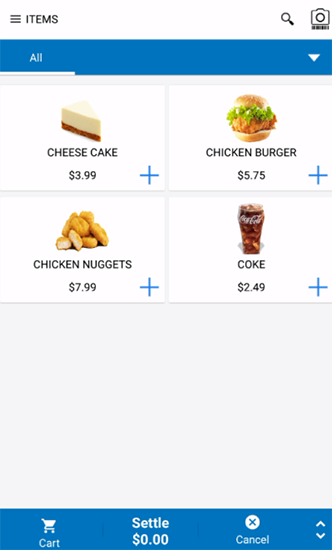
Pick items
Show your menu as a list or a photo grid. Tap + to add.
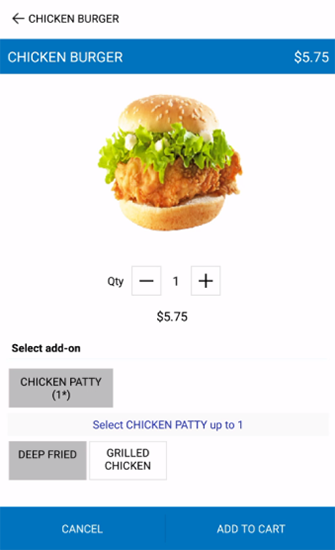
Choose add-ons
Deep fried or grilled? Modifiers pop up when an item needs them.
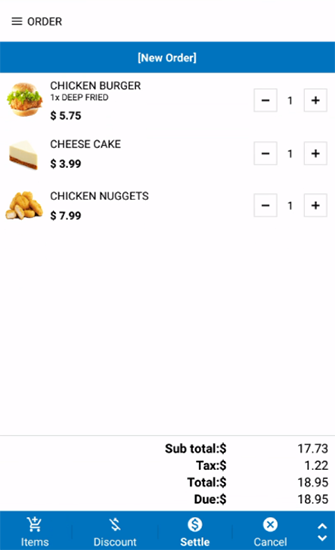
Check the order
Change quantities, add a discount, and see tax worked out for you.
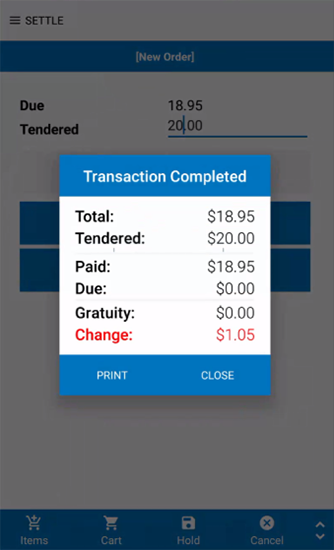
Settle and print
Enter what the customer hands you. Siiopa shows the change and prints the receipt.
Coffee shop POS questions
How much does it cost to start with Siiopa?
The Siiopa app is free to start, with no credit card needed, and it runs on the Android phone or tablet you already own. A receipt printer is optional.
Can I add milk, extra shots and syrups?
Yes. Set them up as extras on each drink. They stay with the item and show on the order and the receipt.
How do I call out orders?
Each order gets a token number, so you can call the number when the drink is ready.
Does it work if the café Wi-Fi goes down?
Yes. Orders are saved on your phone or tablet, then sync to Siiopa Cloud when you're back online.
How fast can I set up my menu?
Start from the sample menu or import a spreadsheet, then edit prices and photos at siiopa.com. Changes sync to every device.
Which devices does Siiopa run on?
Android phones and tablets running Android 6.0 or newer.
Running a food truck too? See Siiopa for food trucks.
Set up your coffee shop before tomorrow morning.
Register on siiopa.com, install the app, and log in with the same email.